

Things look very different today. Wipro sells a 9-watt smart bulb — the kind that supports 16 million colours and works with Alexa and Google Assistant — for under ₹900. Amazon’s Echo Pop landed in India at ₹4,999. TP-Link’s Tapo security cameras hover around ₹3,500. Suddenly, the math started making sense for regular people living in regular 2BHKs.
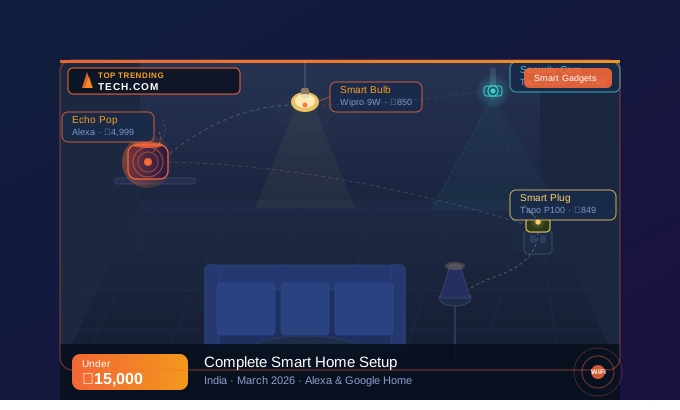
This guide is for exactly those people. If you’ve been curious about smart home setup in India but assumed it was too expensive or too complicated, read on. We’re going to walk through everything — the gear, the prices, the setup steps, and the inevitable Wi-Fi headaches — for a total budget of under ₹15,000.
The Four Things Your Smart Home Actually Needs
Forget the YouTube videos showing homes with 40 connected devices and colour-changing LED strips behind every piece of furniture. A genuinely useful smart home — one that saves you time and makes everyday life a little less annoying — really comes down to four things.


1. Smart Bulbs — Start Here, Always
Smart bulbs are the easiest entry point into a smart home setup in India, and for good reason. You screw them in exactly like a regular bulb. No wiring. No electrician. No permission from your landlord.
Once they’re in, you can dim them, change their colour, set them on a schedule, or just yell “Alexa, turn off the bedroom light” from your bed at 11 PM. The Wipro and Syska options use the standard B22 bayonet cap that fits virtually every light fitting in Indian homes. Crucially, they connect directly to your home Wi-Fi — no separate hub required. That’s the detail that matters most at this budget.
2. Smart Plug — The Quiet Overachiever
A smart plug is the gadget nobody talks about but everyone ends up loving. It sits between your wall socket and your appliance — your table fan, your floor lamp, your old water heater — and instantly makes that appliance voice-controllable and schedulable.
Your fan isn’t smart. But with a ₹700 Tapo plug, you can tell Alexa to turn it off when you leave the house. You can schedule it to switch on five minutes before your alarm rings on summer mornings. That’s a genuine quality-of-life improvement, not a gimmick.
3. Smart Speaker — The Hub Everything Talks To
You need something to actually respond to your voice and coordinate all the devices. That’s what a smart speaker does. Think of it as the brain of the operation.
In India in 2026, the Amazon Echo range running Alexa is your best bet. The ecosystem support is wider, the Hindi voice recognition works reliably (something that genuinely matters when you’re saying “Alexa, bedroom ki light band karo” at midnight), and the products are available everywhere from Amazon.in to local electronics shops. Google Nest speakers are a solid alternative — especially if your life runs on Google Calendar and Gmail — but Alexa edges ahead on smart home compatibility for Indian products.
4. Security Camera — Peace of Mind Without a Monthly Bill
An indoor Wi-Fi camera lets you check what’s happening at home from anywhere with a phone signal. Useful when you’re travelling. Reassuring when your elderly parents are home alone. Handy for watching your dog destroy the sofa in real time.
The TP-Link Tapo C200 is the go-to recommendation at this price point and has been for a while now — because it just works. You get 1080p video, a 360-degree pan/tilt motor, decent night vision up to 40 feet, two-way audio, and motion alerts sent straight to your phone. It stores footage locally on a microSD card, so unlike some competitors, there’s no subscription needed to actually use the thing.
What to Buy: Products & Prices (March 2026)
Smart Bulbs — Pick One Brand and Stick with It
Mixing brands across bulbs isn’t a disaster, but it means juggling two apps. Pick one and commit.
| Product | What you get | Price (each) |
| Wipro 9W B22 Smart LED (NS9400) | 16M colours, music sync, Alexa + Google, no hub needed | ₹799–900 |
| Syska 7W B22 Smart RGB (SSK-SMW-07) | 16M colours, direct Wi-Fi, Alexa + Google, easy scheduling | ₹631–750 |
| Philips WiZ B22 9W Wi-Fi LED | 16M colours, WiZ app, Alexa + Google + Siri, preset moods | ₹1,100–1,400 |
★ Best value: Wipro NS9400 or Syska SSK-SMW-07. Both do everything you’d want. The Philips WiZ is worth it if you want the extra polish of the WiZ app and Apple Home compatibility.
Smart Plug — TP-Link Tapo P100
Price: ₹699–999 • Where to buy: Amazon.in, Flipkart, local electronics stores
The Tapo P100 is the most reliable sub-₹1,000 smart plug available in India right now. It supports Alexa and Google Assistant, works without a hub, and has an ‘away mode’ that randomly switches your lights on and off to make the house look occupied while you’re travelling. The Tapo app works in English and Hindi. Setup takes about five minutes.
Smart Speaker — Amazon Echo Pop
Price: ₹4,999–5,499 • Where to buy: Amazon.in (often on sale during Great Indian Festival)
This is the most affordable full-featured Alexa speaker Amazon sells in India. The sound is surprisingly decent for the size, it understands Hindi and English commands without frustrating pauses, and it streams from Spotify, JioSaavn, Amazon Music, and Apple Music. If you want motion detection and a temperature sensor baked in, step up to the Echo Dot 5th Gen at around ₹5,499–5,999 — the extra features unlock smarter automation routines.
Security Camera — TP-Link Tapo C200
Price: ₹3,499–3,999 • Also needed: 32GB microSD card (₹300–400) for local recording
Still the benchmark for indoor smart cameras in India at this price. The 360-degree pan/tilt means you can cover an entire living room from one corner. Setup is done entirely through the Tapo app by scanning a QR code — straightforward enough that you won’t need to watch a YouTube tutorial. One note: buy the microSD card at the same time. The camera will work without it, but you’ll lose the ability to review past footage.
The Full Cost Breakdown
| What you’re buying | Product | Approx. Cost |
| Smart Bulbs ×2 | Wipro 9W B22 NS9400 (x2) | ₹1,600–2,000 |
| Smart Plug ×1 | TP-Link Tapo P100 | ₹700–1,000 |
| Voice Hub | Amazon Echo Pop | ₹4,999–5,499 |
| Security Camera | TP-Link Tapo C200 (+ 32GB microSD) | ₹3,799–4,399 |
| Router | Your existing 2.4GHz router | ₹0 |
| — | GRAND TOTAL | ₹11,098–12,898 |
Prices from Amazon.in, Flipkart, and Reliance Digital as of March 2026. Expect 5–10% variation depending on ongoing sales. The Echo Pop in particular regularly drops by ₹500–1,000 during Amazon sale events.
Setting It All Up: A Plain-English Walkthrough
A note before you start: pick one ecosystem — Alexa or Google Home — and use it for everything. The steps below follow the Alexa path, which is what we’d recommend for most people in India. Google Home users will find the process nearly identical; the app menus just look different.
| ✓ Before you begin You’ll need a 2.4GHz Wi-Fi network (check your router settings — most Jio Fiber and Airtel routers broadcast both 2.4GHz and 5GHz), a smartphone running Android 6.0+ or iOS 12+, and the following apps installed: Amazon Alexa, Wipro Next Smart (or Syska Smart Home), and Tapo. |
Phase 1: Get Your Echo Speaker Online
- Plug in the Echo Pop. The LED ring glows orange — that’s it telling you it’s ready to be set up.
- Open the Alexa app on your phone and tap the Devices icon at the bottom right.
- Tap the ‘+’ button → Add Device → Amazon Echo, and follow the prompts.
- When it asks for Wi-Fi, choose your 2.4GHz network. Not the 5GHz one — smart devices generally don’t support it.
- Set your language preference to English or Hindi. Both work well with Indian accents.
Once this is done, try asking “Alexa, what’s the weather today?” — if she answers, you’re good to move on.
Also Read Top AI Tools Transforming Business in 2026
Phase 2: Install Your Smart Bulbs
- Screw in the Wipro (or Syska) bulb. Make sure the wall switch is on — the bulb needs power to pair.
- Open the Wipro Next Smart app (or Syska Smart Home app) and create a free account.
- Follow the in-app pairing process. The bulb will flash rapidly when it’s in pairing mode. If it doesn’t, turn the wall switch off and on three times quickly.
- Connect the bulb to your 2.4GHz Wi-Fi network when prompted.
- Now open the Alexa app → Skills & Games → search for ‘Wipro’ (or ‘Syska’) → Enable Skill → link your account.
- Say “Alexa, discover devices.” She’ll find your bulb within 20–30 seconds.
- Test it: “Alexa, turn on the bedroom light.”
Using Google Home instead? Open Google Home → tap ‘+’ → Set up device → Works with Google → search for your bulb brand and link the account.
Phase 3: Set Up the Smart Plug
- Download the Tapo app and sign in or create a TP-Link account.
- Push the Tapo P100 into your wall socket, then plug your appliance into the Tapo. The plug’s LED flashes amber when ready.
- In the Tapo app, tap ‘+’ → Add Device and follow the pairing steps.
- Back in the Alexa app, go to Skills, enable the Tapo skill, and link your Tapo account.
- Say “Alexa, discover devices,” then try “Alexa, turn off the fan.”
Phase 4: Get Your Camera Up and Running
- Position the Tapo C200 where you want it — a shelf works fine, or use the included bracket to wall-mount it.
- Plug in the camera and wait for the status indicator to start blinking orange.
- Insert your microSD card now, before you complete setup. It’s easier than doing it later.
- In the Tapo app, tap ‘+’ → Camera → scan the QR code on the bottom of the camera. Follow the steps to connect to your Wi-Fi.
- Enable the Tapo Alexa skill if you haven’t already. On an Echo Show, you can then say “Alexa, show me the living room” to pull up the feed directly.
Phase 5: Set Up Routines (This Is Where It Gets Fun)
Routines are what separate a smart home from just a collection of app-controlled gadgets. They let multiple devices work together automatically, triggered by a voice command, a time of day, or a sensor event.
A few routines worth setting up immediately:
- “Alexa, good morning” → bedroom bulb ramps up to full brightness, Alexa reads the day’s weather and your first calendar event.
- “Alexa, movie time” → living room bulb dims to 20%, fan plug turns off so it’s not noisy.
- Scheduled: bedroom light switches off at 11 PM, turns back on at 6:30 AM on weekdays.
- Away mode: smart plug on the floor lamp randomly turns on and off between 7 PM and 10 PM while you’re on holiday.
To create one: open the Alexa app, tap ‘More’ at the bottom → Routines → ‘+’. Build it step by step from there.
When Things Go Wrong: Common Issues and Fixes
The bulb won’t connect to Wi-Fi
Nine times out of ten, this is a 2.4GHz vs 5GHz issue. Smart bulbs do not work on 5GHz networks. Log into your router (usually 192.168.1.1) and check that your 2.4GHz band has its own network name. Use that name during bulb setup. If your Jio or Airtel router combines both bands under one name, you may need to call support and ask them to separate the SSIDs.
If the bulb was previously paired to another device, you need to reset it: flick the wall switch off and on three times in quick succession until the bulb flashes rapidly.
Alexa can’t find your device
Two things to check. First, is the third-party skill (Wipro, Syska, or Tapo) enabled in the Alexa app, and is the account properly linked? This step trips up a lot of people. Second, after linking, always say “Alexa, discover devices” — she won’t automatically find new gadgets without being asked.
Also, give your devices simple names in the brand app before linking. “Bedroom light” is a voice command that works. “Wipro NS9400 Room 1” is not.
App crashes on older Android phones
The Wipro Next Smart and Syska Smart Home apps both require Android 6.0 or later. If you’re running anything older, you’ll hit compatibility walls. If your phone does meet the requirement but the app still crashes, try clearing its cache: Settings → Apps → find the app → Clear Cache. A fresh install often helps too.
Camera feed is choppy or drops out
Smart cameras need at least 2 Mbps of upload speed for stable 1080p streaming. Run a quick test at fast.com. If you’re getting less than 2 Mbps upload, that’s your problem — not the camera. A Wi-Fi extender or a powerline adapter between your router and the room where the camera lives will usually solve range issues. Alternatively, drop the stream to 720p in the Tapo app settings; it uses roughly half the bandwidth.
Should I use Alexa or Google Home?
Both are good. But if this is your first smart home setup and you’re buying Indian products like Wipro or Syska, Alexa has more compatible skills and a wider device ecosystem in India right now. It also handles Hindi commands more consistently. Go with Google Home if you’re deeply invested in Google’s services — it integrates beautifully with Google Calendar, Maps, and Gmail.
What to Add Once You’ve Got the Basics Down
Think of this as a roadmap, not a shopping list. Get comfortable with the core setup, use it for a month or two, and then expand when it makes sense.
| Stage | What to add | Budget |
| Stage 2 (₹15K–25K) | 2 more smart bulbs + IR blaster (Oakter/Broadlink) for AC & TV | ₹3,000–5,000 |
| Stage 3 (₹25K+) | Smart door lock (Godrej/Yale) + video doorbell (Qubo/Ring) | ₹8,000–15,000 |
| Stage 4 (Pro) | Mesh Wi-Fi (TP-Link Deco) + smart geyser / AC thermostat control | ₹6,000–12,000 |
One rule applies throughout every stage: stay in the same ecosystem. If you started with Alexa, keep buying Alexa-compatible devices. Mixing Alexa and Google Home is possible, but it creates friction. Keep things simple and you’ll actually use the automation you set up.
Final Thoughts
There’s a version of this article that ends with “your smart home journey starts today!” and twelve exclamation marks. This isn’t that version.
Here’s the honest summary: two smart bulbs, a smart plug, an Echo Pop, and a Tapo camera will cost you somewhere between ₹11,000 and ₹13,000. In return, you get a home that responds to your voice, lights that turn off automatically when you forget, a camera you can check from your office, and appliances on a schedule. That’s real, everyday value — not a tech demo.
The setup takes an afternoon. The troubleshooting, if any, takes another hour. After that, it just runs. And six months from now, when someone visits and you say “Alexa, dim the lights” and everything works, you’ll wonder why you waited this long.




