

Quick Summary
- EPFO members can check their PF balance online using their UAN and passbook.
- EPFO also provides PF balance information through the UMANG app.
- Members can check their latest PF balance through a missed call from their registered mobile number.
- PF balance can also be checked through SMS using the UAN-linked mobile number.
- EPFO advises members not to share their UAN, password, Aadhaar, PAN, bank details or OTP with anyone.
How to Check EPFO PF Balance Online
Employees who contribute to the Employees’ Provident Fund can check their accumulated PF balance without visiting an EPFO office. The Universal Account Number (UAN) allows members to access their PF information and passbook online.
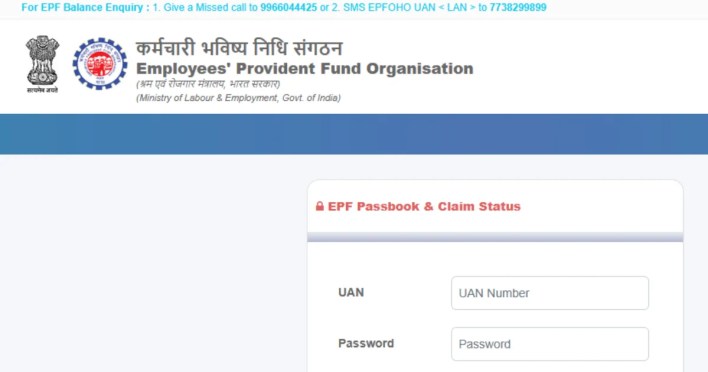
EPFO currently provides several ways to check PF balance, including the member portal, Passbook service, UMANG app, SMS and missed-call facility. EPFO has also introduced Passbook Lite in the member portal, allowing members to view a simplified summary of contributions, withdrawals and balance through the member portal itself.
Here are the main methods you can use to check your EPFO PF balance.
Method 1: Check EPFO PF Balance Online Using UAN
The EPFO member portal is one of the most convenient ways to check your PF details.


Step 1: Open the EPFO Member Portal
Visit the official EPFO member portal and log in using your UAN and password.
Make sure you use the official EPFO website before entering your personal or account information.
Step 2: Log In With Your UAN
Enter your:
- UAN
- Password
- Captcha, if requested
After successful authentication, you can access the services available through your member account.
Step 3: Check Passbook or Passbook Lite
EPFO’s member portal now provides Passbook Lite, which offers a simplified view of your PF contributions, withdrawals and balance.
For a more detailed statement, members can continue to use the existing EPFO Member Passbook service.
The passbook can show information associated with your PF member IDs, including contribution transactions.
Method 2: Check PF Balance Through EPFO Passbook
You can also directly use the official EPFO Member Passbook service.
The Passbook portal requires your UAN and password for login. Once signed in, you can view the available PF passbook information.
Steps to Check PF Balance Through Passbook
- Open the official EPFO Member Passbook website.
- Enter your UAN.
- Enter your EPFO password.
- Enter the captcha shown on the page.
- Click Sign In.
- Select the relevant PF member ID if multiple member IDs are displayed.
- Check your available PF balance and contribution details.
EPFO’s FAQ confirms that members can activate their UAN and use the passbook to check or download their PF balance information.
Method 3: Check EPFO PF Balance Through UMANG
EPFO services are also available through the UMANG (Unified Mobile Application for New-age Governance) platform. EPFO states that its member passbook service can be accessed through UMANG as well as the Passbook portal.
Steps to Check PF Balance Using UMANG
- Open the official UMANG app.
- Select EPFO services.
- Choose the relevant PF/passbook service.
- Enter the requested UAN details.
- Complete the required verification.
- View your PF balance and contribution information.
EPFO specifically warns users that there is no EPFO-related app other than UMANG and advises members to avoid fake websites and applications claiming to provide EPFO services.
Method 4: Check PF Balance Through Missed Call
You do not necessarily need a smartphone or internet connection to check your latest PF balance.
EPFO provides a missed-call facility for eligible members. To use it, give a missed call from your UAN-registered mobile number to:
9966044425
The call automatically disconnects after a short period, and the service is provided without a charge. EPFO’s current website lists this number for PF balance enquiries.
According to EPFO, the mobile number must be activated with the UAN, and at least one of the required KYC details, such as bank account, Aadhaar or PAN, should be seeded with the UAN for the missed-call service.
Method 5: Check PF Balance Through SMS
Another option is to request your latest PF contribution and balance information through SMS.
From your UAN-registered mobile number, send:
EPFOHO UAN
to:
7738299899
EPFO also supports several Indian languages for this SMS service. For example, members who want the response in Tamil can use:
EPFOHO UAN TAM
The supported language codes include Hindi, Punjabi, Gujarati, Marathi, Kannada, Telugu, Tamil, Malayalam and Bengali.
EPFO says the SMS response can include the member’s latest PF contribution and balance information along with available KYC information.
Which Method Is Best for Checking PF Balance?
| Method | What You Need | Best For |
|---|---|---|
| EPFO Member Portal | UAN and password | Online balance and account services |
| EPFO Passbook | UAN and password | Detailed passbook information |
| UMANG | Mobile phone and required verification | Checking PF services from smartphone |
| Missed Call | UAN-linked mobile number | Quick balance enquiry |
| SMS | UAN-linked mobile number | Balance enquiry without internet |
Why Is My EPFO PF Balance Not Showing?
Sometimes your latest contribution may not immediately appear in the passbook.
EPFO has previously issued notices about temporary delays in passbook updates during system upgrades and technical work. If a recent contribution is missing, check again later and verify whether the employer has deposited the contribution.
EPFO also notes that members working in an exempted establishment may not have their passbook available through the standard UAN portal. In such cases, the member should contact the establishment for the PF statement.
What Information Can You See in Your EPF Passbook?
Depending on the service and account information available, the passbook can help you track your PF transactions, including contributions and withdrawals.
If you have changed jobs and have multiple member IDs linked to your UAN, the passbook can also help you check the status of balances associated with those member IDs. EPFO says transferred PF amounts can appear as credit entries in the latest member ID after the transfer.
Important EPFO Safety Tips
PF accounts contain financial and personal information, so be careful when accessing your account.
- Use only official EPFO services.
- Never share your UAN password with another person.
- Never share OTPs received for EPFO services.
- Do not share Aadhaar, PAN or bank account details with unknown callers.
- Avoid unofficial EPFO apps and websites.
- Do not make payments to anyone claiming to be an EPFO representative.
- Check the website address before entering your account details.
EPFO specifically warns members that its officials do not ask for personal or financial details such as Aadhaar, PAN, bank information or OTPs through calls or messages.
Frequently Asked Questions
How can I check my EPFO PF balance online?
You can check your PF balance by logging into the EPFO member portal or Member Passbook using your UAN and password. EPFO also provides a simplified Passbook Lite facility through the member portal.
Can I check my PF balance without logging into the EPFO website?
Yes. Eligible members can use the missed-call or SMS facility from their UAN-registered mobile number.
What is the EPFO missed-call number for checking PF balance?
The current EPFO website lists 9966044425 for PF balance enquiries through the missed-call facility.
What SMS should I send to check my PF balance?
Send EPFOHO UAN to 7738299899 from the mobile number registered with your UAN. You can add a supported language code after your UAN for responses in other available languages.
Can I check my PF balance using UMANG?
Yes. EPFO’s member passbook service is available through the UMANG app.
Why is my latest PF contribution not showing?
A recent contribution may take time to appear in the passbook, particularly during system updates or processing. If the contribution remains missing, check with your employer or EPFO.
Is there an official EPFO app for checking PF balance?
EPFO states that UMANG is the official mobile application through which its services are available and warns users about fake EPFO-related apps.
Conclusion
Checking your EPFO PF balance is possible through several official channels. The EPFO member portal and Passbook service are useful when you want to see detailed account information, while SMS and the missed-call service provide quicker ways to check your latest balance.
For smartphone users, UMANG provides another official route to EPFO services. Whichever method you choose, make sure you use official EPFO services and never share your OTP, password or financial information with anyone.
For the latest technology news, AI developments, smartphone launches, telecom updates, Windows guides, Android tips, and detailed how-to articles, follow TopTrendingTech.com. We publish verified technology news, practical tutorials, and unbiased analysis to help readers stay informed.





